
How to Clean and Format B2B Lead CSV Data for Cold Outreach: Production Playbook
Step-by-step engineering playbook on how to clean, validate, deduplicate, and format B2B lead CSV data for cold email and WhatsApp outreach pipelines.
Sikander Ali
Senior Software Architect, TechnoFreaks
Key Takeaways (TL;DR)
- Data Hygiene Standards: Always enforce E.164 phone formatting and automated deduplication before importing lists into campaign dispatchers.
- Composite Deduplication: Never match on company names alone; use combined E.164 phone numbers and root domain hashes.
- Dynamic Segmentation: Split CSV records into micro-audiences based on review volume, website status, and niche category.
- Direct Automation Sync: Modern teams eliminate manual CSV uploads by streaming extracted records straight into native CRM tables.
# Introduction
CSV files are the lifeblood of B2B lead generation. From Google Maps data extraction to multi-channel outreach deployment, proper CSV management makes the difference between high deliverability and burned domains.
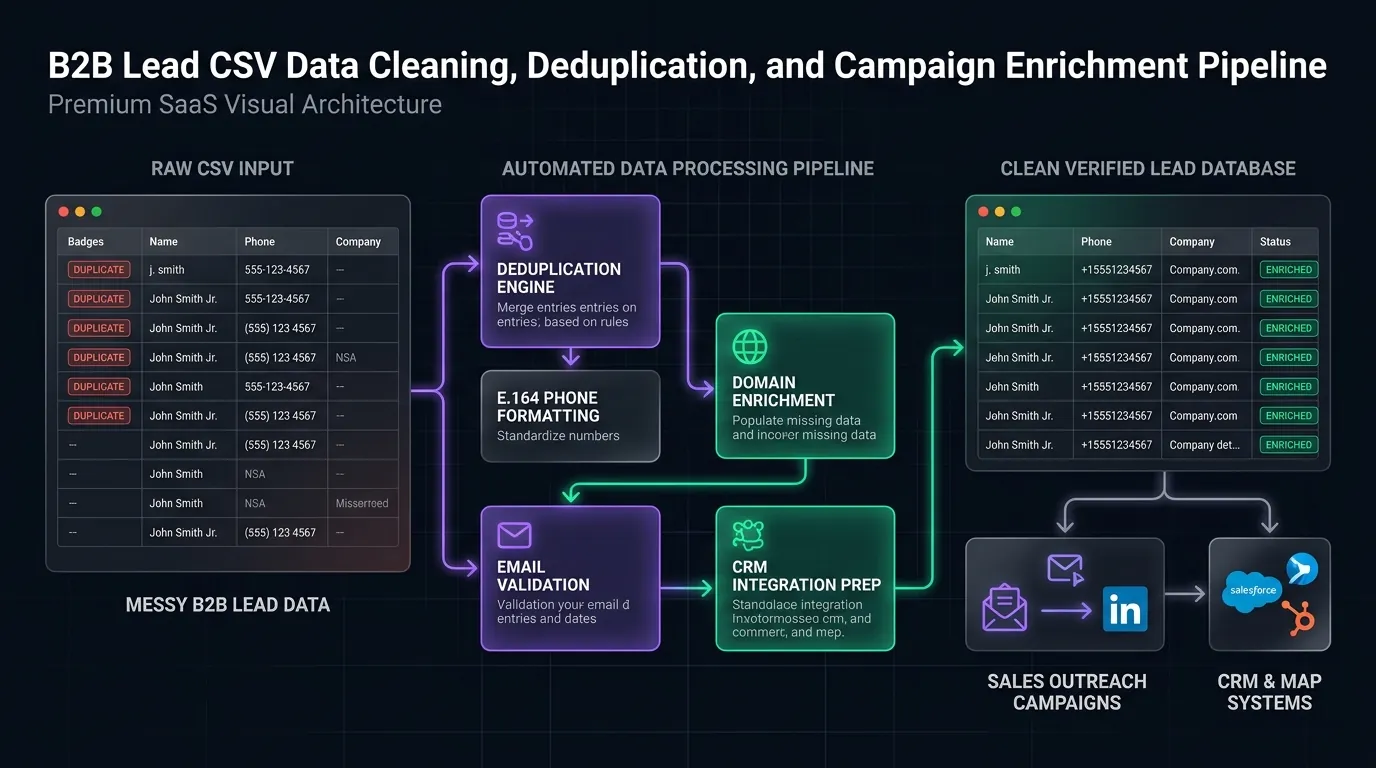
In this playbook, we'll walk through our production data pipeline: cleaning raw scraping dumps, formatting telephone numbers for WhatsApp APIs, deduplicating contacts across batches, verifying MX records and SSL certificates, and segmenting prospects for maximum response rates.
# The True Cost of Dirty Lead Data
When outbound teams purchase bulk scraping lists or scrape raw data from web directories without validation, they introduce significant technical debt into their outreach infrastructure:
Raw Scraped List (1,000 Contacts)
├── 120 Invalid / Disconnected Landlines (Carrier Penalties)
├── 85 Dead Domains / 404 Parking Pages (Wasted Demo Pitching)
├── 48 Role-Based Spam Traps (postmaster@, abuse@, info@)
└── 110 Duplicate Records across Metropolitan Sub-Grids
─────────────────────────────────────────────────────────────
Real Deliverable Audience: Only 637 Prospects (36.3% Waste)
# 1. Burned Domain Sender Reputation
Email service providers (Google Workspace, Microsoft 365, Zoho) actively monitor the Hard Bounce Ratio of every sending domain. If your campaign produces a bounce rate exceeding 2.0%, automated spam-filtering heuristics classify your domain as an untrusted bulk spammer. Reversing a domain blacklist penalty takes between 6 and 12 weeks of costly email warmup.
# 2. WhatsApp Business Account Suspension
Unlike cold email where soft bounces simply drop, sending automated WhatsApp messages to landlines, VoIP virtual numbers, or unassigned telephone blocks triggers instant delivery error codes (Error 131026: Message Undeliverable). If your account's message delivery failure rate exceeds 6.0% within a rolling 24-hour window, Meta's automated enforcement system downgrades your phone number's Quality Rating from Green to Red and caps daily conversation limits at 250 conversations.
# 3. Sales Team Fatigue
Your sales development reps (SDRs) waste hundreds of hours manually researching broken links, dialing disconnected numbers, and reaching gatekeepers who have no buying authority. High-converting outbound requires laser-targeted, pre-qualified, campaign-ready data.
# Standard Production Lead Schema
Before running any extraction or cleaning routine, enforce a unified schema across all ingestion channels. Every column header must follow lower_snake_case with strict data type typing:
| Column Header | Required | Format / Type | Example Value | Validation Rule |
|---|---|---|---|---|
company_name |
Yes | String (Trimmed) | Apex Plumbing & Heating | Max 80 chars, strip legal suffix |
phone_raw |
No | String | (214) 555-0198 | Original directory phone string |
phone_e164 |
Yes | E.164 String | +12145550198 | Match ^\+[1-9]\d{7,14}$ |
is_mobile |
Yes | Boolean | TRUE | Verified mobile carrier routing |
contact_email |
No | RFC 5322 Email | david@apexplumbing.com | Valid MX record required |
website_url |
No | Valid URL | https://apexplumbing.com | Canonical protocol included |
has_website |
Yes | Boolean | FALSE | Flagged for demo site generation |
address_street |
Yes | String | 1402 Commerce St | Normalized USPS/OSM format |
city |
Yes | String | Dallas | Title case string |
state |
Yes | 2-Letter Code | TX | Standard postal code |
postal_code |
Yes | Postal String | 75201 | Trimmed postal string |
rating |
No | Float (1.0–5.0) | 4.8 | Review rating score |
review_count |
No | Integer | 142 | Verified public review count |
category |
Yes | String | Plumbing Contractor | Unified taxonomy tier |
# Complete Python Data Cleaning Script
Here is the exact data pipeline script our engineering team uses to process thousands of raw directory rows into a pristine, deliverable CSV ready for CRM and outreach dispatch:
import re
import csv
import dns.resolver

def normalize_e164(phone_str: str, default_country: str = "1") -> str:
    """
    Normalizes any international phone string into strict E.164 format.
    Example: '(214) 555-0198' -> '+12145550198'
    """
    if not phone_str:
        return ""
    # Strip all non-digit characters except leading plus
    digits = re.sub(r"[^\d+]", "", phone_str.strip())
    if not digits:
        return ""
    if digits.startswith("+"):
        clean_num = digits
    elif digits.startswith("00"):
        clean_num = "+" + digits[2:]
    elif len(digits) == 10 and default_country == "1":
        clean_num = "+1" + digits
    else:
        clean_num = "+" + digits

    # E.164 validation: + followed by 7 to 15 digits
    if re.match(r"^\+[1-9]\d{6,14}$", clean_num):
        return clean_num
    return ""

def validate_email_mx(email: str) -> bool:
    """
    Validates email format and verifies whether the domain has active MX records.
    """
    if not email or "@" not in email:
        return False
    email = email.lower().strip()
    regex = r"^[a-zA-Z0-9_.+-]+@[a-zA-Z0-9-]+\.[a-zA-Z0-9-.]+$"
    if not re.match(regex, email):
        return False
    domain = email.split("@")[1]
    try:
        records = dns.resolver.resolve(domain, 'MX')
        return len(records) > 0
    except Exception:
        return False

def clean_company_name(name: str) -> str:
    """
    Strips noise words and legal entities for natural personalization.
    Example: 'Apex Plumbing, LLC' -> 'Apex Plumbing'
    """
    if not name:
        return ""
    cleaned = re.sub(r"(?i)\b(inc|llc|ltd|corp|co|gmbh|pty|pvt)\b[\.]?", "", name)
    cleaned = re.sub(r"\s+", " ", cleaned).strip(" ,.-")
    return cleaned.title()

def deduplicate_leads(input_csv: str, output_csv: str):
    """
    Deduplicates raw scraping batches using composite primary keys:
    Normalized E.164 phone + normalized website domain.
    """
    seen_phones = set()
    seen_domains = set()
    cleaned_rows = []

    with open(input_csv, mode="r", encoding="utf-8-sig") as f:
        reader = csv.DictReader(f)
        fieldnames = reader.fieldnames or []
        for row in reader:
            phone_e164 = normalize_e164(row.get("phone", ""))
            website = row.get("website", "").lower().strip()

            # Domain key extraction
            domain = ""
            if website:
                domain_match = re.search(r"https?://(?:www\.)?([^/]+)", website)
                domain = domain_match.group(1) if domain_match else website

            # Composite deduplication check
            if phone_e164 and phone_e164 in seen_phones:
                continue
            if domain and domain in seen_domains:
                continue

            if phone_e164:
                seen_phones.add(phone_e164)
            if domain:
                seen_domains.add(domain)

            row["company_name"] = clean_company_name(row.get("company_name", ""))
            row["phone_e164"] = phone_e164
            cleaned_rows.append(row)

    with open(output_csv, mode="w", encoding="utf-8", newline="") as f:
        writer = csv.DictWriter(f, fieldnames=fieldnames)
        writer.writeheader()
        writer.writerows(cleaned_rows)
# Step-by-Step Data Cleaning Pipeline
# 1. Phone Normalization (E.164 Standard)
Raw scraping data contains diverse phone formats: (214) 555-0198, 214.555.0198, or 0214 555 0198.
All numbers must be normalized into international E.164:
- Strip all non-numeric characters:
(,),-,., and spaces. - Remove leading zeros from country/area prefixes.
- Prepend the target country dialing code (e.g.,
+1for North America,+44for UK). - Verify character length (typically 10–12 digits).
# 2. Website & SSL Verification
Run automated HEAD requests against provided website URLs:
- HTTP Status 200/301: Mark as active website.
- HTTP Status 404/500 or Expired SSL: Mark as broken domain opportunity.
- Blank/Empty: Tag as unlisted "No Website" opportunity (highest conversion segment).
# 3. Deduplication via Composite Keys
Never deduplicate on company name alone ("Apex Plumbing" vs "Apex Plumbing LLC"). Instead, deduplicate using composite primary keys:
- Primary: Cleaned E.164 Phone Number
- Secondary: Normalized Website Root Domain
# Smart Segmentation for Higher Reply Rates
Don't send the same message to everyone in your CSV. Split your leads into micro-audiences:
- Segment A: High Reviews, Zero Website (4.5+ stars, >50 reviews, no website). Pitch: Instant mobile site to capture direct bookings.
- Segment B: Slow Mobile Experience (Mobile page load >5s). Pitch: Core Web Vitals speed optimization scorecard.
- Segment C: Unclaimed Google Business Profile (Missing phone or address fields). Pitch: Local SEO and profile optimization package.
# Automate Extraction & Cleaning with SitePitch
Instead of writing custom Python scripts or wrestling with Excel formulas, use SitePitch's native B2B contact extractor. For teams engineering custom pipelines, our technical guide on Google Maps scraping without IP bans covers coordinate grid tiling and residential proxy pool rotation.
Our platform automatically extracts Google Maps listings, normalizes phone numbers to E.164, verifies website status, and filters junk records in real time—delivering campaign-ready data with zero manual formatting.
# Summary & Next Steps
Clean data is the foundation of high-converting B2B outreach. By enforcing standardized schema formatting and composite deduplication, your team protects sender reputation and maximizes closed retainers.
Start generating clean, validated lead lists today with SitePitch and get 50 free verified lead credits.
Find Local Businesses Without Websites in 60 Seconds
SitePitch extracts verified leads from Google Maps, generates instant live demo websites on subdomains, and qualifies prospects with autonomous conversational AI voice callers.
Frequently Asked Questions
Written by Sikander Ali
Senior Software Architect, TechnoFreaks
Specializing in programmatic lead generation, headless Google Maps extraction, and conversion-optimized sales workflows for high-growth digital agencies.
Related Playbooks
Expand your outbound capabilities with complementary guides