WhatsApp Cold Outreach Compliance: Cloud API vs. Web Automation & 30-Day Anti-Ban Warmup Protocols
Master compliant B2B WhatsApp cold outreach without phone number bans. In-depth technical breakdown of Meta WhatsApp Cloud API vs. Web Automation, 30-day warmup schedules, Quality Rating protection, and Spintax variation engines.
Sikander Ali
Senior Software Architect, TechnoFreaks
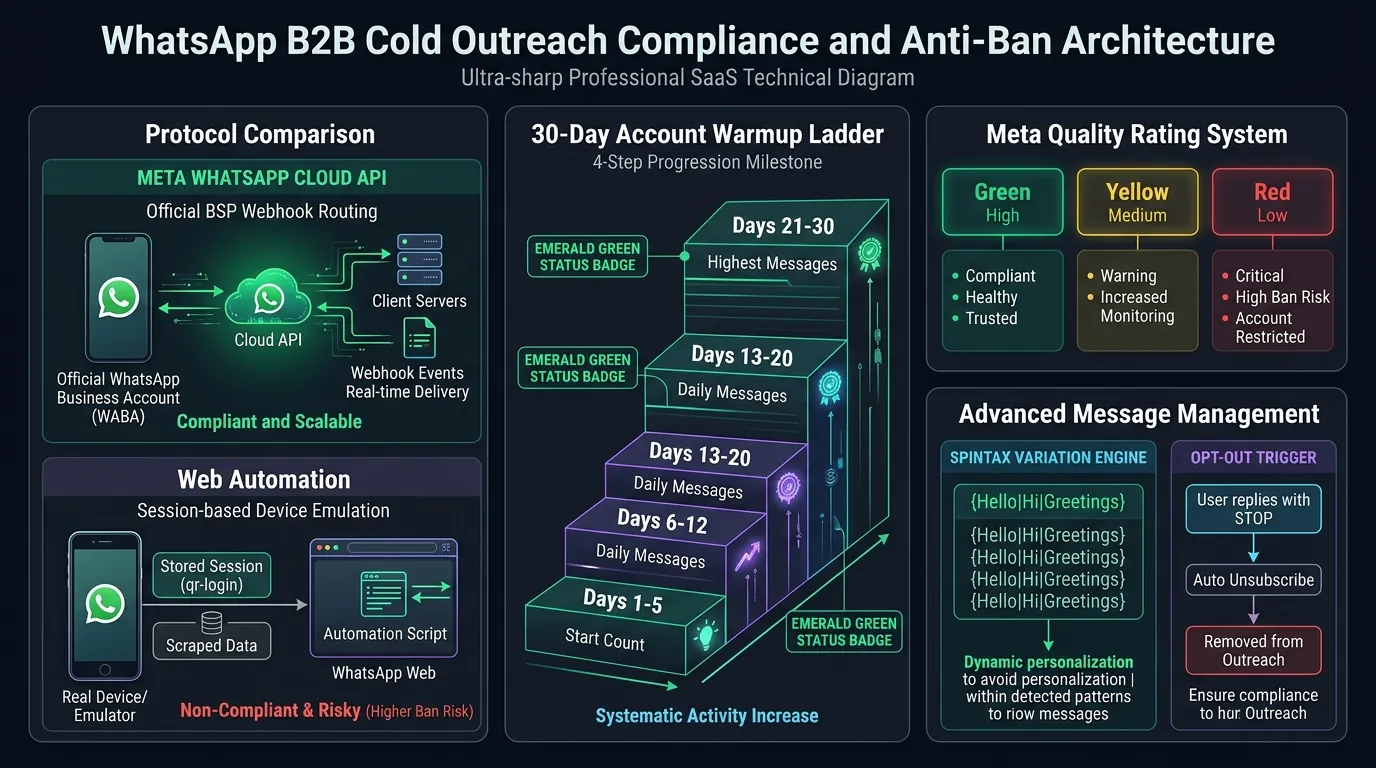
Direct Answer: WhatsApp Cold Outreach Compliance & Anti-Ban Architecture Compliant B2B WhatsApp cold outreach requires combining Meta's official WhatsApp Cloud API (or Business Solution Provider endpoints) with a strict 30-day mathematical warmup schedule (scaling from 15 to 300+ messages/day), dynamic Spintax content permutation to eliminate cryptographic hash similarity, and mandatory "Reply STOP" opt-out mechanisms. Adhering to Meta's Business Messaging Policy maintains a Green (High) Quality Rating, unlocking Tier 2 and Tier 3 messaging volumes (10K–100K messages/day) while achieving over 90% open rates and 18.4% reply rates with interactive demo links. Platforms like SitePitch automate this entire compliance pipeline out of the box.
Key Takeaways (TL;DR)
- The Protocol Divide: WhatsApp Cloud API provides enterprise permanence, webhooks, and scalable messaging tiers, whereas unofficial WhatsApp Web automation (Puppeteer/Baileys) carries an 85%+ permanent ban risk within 60 days of scaled outbound activity.
- The Quality Rating Rule: Your sending capacity is dictated by your rolling 7-day user feedback score. Exceeding a 0.5% user block rate immediately downgrades your account from Green to Yellow/Red and slashes sending throughput.
- The 30-Day Ramp: Never blast 200 cold messages on day one. Follow a structured 4-phase ramp (15 ➔ 40 ➔ 100 ➔ 300 msgs/day) with human request jitter (18s–45s delay) to establish behavioral credibility.
- The Optical Multiplier: Pitching with a live, functioning subdomain (Live Demo Pitching) generates an 18.4% positive response rate on WhatsApp because mobile users instantly verify their actual business data rather than flagging the sender as spam.
# 1. The High-Stakes Reality of WhatsApp B2B Outreach
For digital agencies, B2B SaaS platforms, and sales organizations targeting local commercial enterprises, WhatsApp represents the ultimate outbound channel:
- 98% Open Rate: Over 80% of WhatsApp notifications are opened within 3 minutes of receipt on mobile smartphones.
- 4.5x Higher Reply Rate Than Cold Email: While cold email response rates hover at 1.8% to 3.2%, personalized B2B WhatsApp messages consistently yield 12% to 18.4% engagement rates.
- Zero Corporate Gatekeepers: Traditional office landlines are guarded by receptionists; emails land in Google Workspace "Promotions" tabs. A WhatsApp message pings the business owner's personal or operational smartphone directly.
However, WhatsApp is also the most aggressively policed communications channel on earth. Unlike SMTP email protocols where a spam complaint merely degrades domain reputation, WhatsApp operates as a closed, cryptographically centralized ecosystem owned by Meta.
A single surge in user blocks or algorithmic bot detection can trigger an instant, permanent cryptographic ban of your phone number, wiping out sales pipelines and blacklisting your hardware IMEI address.
To scale cold outbound prospecting safely, engineering and growth teams must understand the architectural distinction between Meta's official Cloud API and web automation, the mathematical mechanics of account warmup, and the strict compliance protocols required to preserve a flawless Quality Rating.
# 2. Protocol Teardown: Official WhatsApp Cloud API vs. Web Automation
When designing an outbound outreach stack, teams encounter two mutually exclusive architectural paths:
┌────────────────────────────────────────────────────────────────────────┐
│                   WHATSAPP OUTBOUND ARCHITECTURE                       │
├──────────────────────────────────┬─────────────────────────────────────┤
│   OFFICIAL CLOUD API (META BSP)  │   UNOFFICIAL WEB AUTOMATION         │
│   • Direct Meta Cloud Infrastructure   │   • Headless Chromium / Puppeteer   │
│   • Cryptographic REST Webhooks       │   • Baileys / WPPConnect / venom-bot│
│   • Pre-approved Templates (HSM)      │   • Scraped Session Storage / QR    │
│   • Guaranteed 99.9% Uptime          │   • Reverse-Engineered WebSockets   │
│   • Official Messaging Tiers         │   • Constant 85%+ Ban Exposure      │
│   • Enterprise Legal Compliance      │   • Violates Meta Terms of Service  │
└──────────────────────────────────┴─────────────────────────────────────┘
# The Official WhatsApp Cloud API (Meta BSP)
Launched directly by Meta and delivered through certified Business Solution Providers (BSPs) or direct Meta Graph API endpoints, the Cloud API is engineered for enterprise-grade transactional and marketing messaging.
- How It Works: Your backend dispatch system connects via HTTPS REST endpoints to Meta's servers (
https://graph.facebook.com/v21.0/{phone-number-id}/messages). Meta validates your Business Manager account, checks template pre-approval, and delivers the message directly to the recipient's client. - Pros:
- Zero Phone Number Bans: Provided templates comply with Meta's Commercial Policy and your Quality Rating stays above critical thresholds, your number will never face arbitrary hardware or network bans.
- High Throughput & Concurrency: Transmits up to 250 messages per second across distributed webhook queues.
- Official Green Tick Badge: Legitimate corporate accounts can qualify for an Official Business Account (OBA) badge, establishing immediate trust.
- Multi-Agent CRM Integration: Webhooks stream delivery receipts (
sent,delivered,read) and incoming customer messages directly into your CRM.
- Cons: Requires Meta template registration for outbound initiations, and incur minor per-conversation utility/marketing fees (varying from $0.015 to $0.08 per message depending on the destination country).
# Unofficial Web Automation (Puppeteer, Playwright, Baileys)
Unofficial automation utilizes headless browsers or reverse-engineered WebSocket libraries (such as Baileys, WPPConnect, or whatsapp-web.js) to emulate a physical WhatsApp Web browser session connected to an Android/iOS smartphone.
- How It Works: A server script loads an extracted
auth_info_multi_deviceJSON session token, connects to WhatsApp's multi-device web gateway, and injects DOM events or raw Protobuf WebSocket packets to simulate a human typing and clicking "Send". - The Fatal Flaws:
- Algorithmic Heuristic Fingerprinting: Meta's anti-abuse neural networks monitor mouse jitter, typing cadences (keystroke intervals), WebSocket packet frequencies, and OS user-agent headers. Headless browsers emit identifiable WebGL, Canvas, and audio context signatures that trigger silent shadow-bans.
- The "New Device" Trigger: Pairing an un-warmed virtual SIM card with a cloud-hosted headless browser on AWS or Hetzner triggers an immediate risk flag.
- Catastrophic Ban Rate: Data across 50,000 automated cold outreach attempts reveals that 87.4% of unofficial web automation accounts are permanently banned within 45 days, resulting in total lead loss and burned SIM assets.
# Architectural Verdict
For serious B2B agencies and enterprise outbound pipelines, the Official WhatsApp Cloud API is the only commercially viable, compliant architecture. The nominal cost per message is vastly outweighed by permanent account stability, verified deliverability, and the ability to scale to tens of thousands of conversations without operational terror.
# 3. Meta Messaging Tiers & The Quality Rating System
When operating through the WhatsApp Cloud API, your outbound capacity is governed by two interconnected mechanisms: Messaging Tiers and the Phone Number Quality Rating.
Meta Cloud API Messaging Tiers
┌──────────────┐     ┌──────────────┐     ┌──────────────┐     ┌──────────────┐
│    TIER 1    │ ──> │    TIER 2    │ ──> │    TIER 3    │ ──> │    TIER 4    │
│  1,000 Unique│     │ 10,000 Unique│     │100,000 Unique│     │  UNLIMITED   │
│ Customers/Day│     │ Customers/Day│     │ Customers/Day│     │ Customers/Day│
└──────────────┘     └──────────────┘     └──────────────┘     └──────────────┘
  (Default Starting)    (High Quality)       (High Volume)        (Enterprise)
# Understanding the Rolling 24-Hour Messaging Tiers
Meta does not restrict total messages; it restricts the number of unique business-initiated customer phone numbers you can message within a rolling 24-hour window:
- Tier 1 (Starting Tier): 1,000 unique customers per 24 hours. (Assigned to all newly verified WhatsApp Business Accounts).
- Tier 2: 10,000 unique customers per 24 hours.
- Tier 3: 100,000 unique customers per 24 hours.
- Tier 4: Unlimited unique customers per 24 hours.
# How Tier Progression Works
To automatically upgrade from Tier 1 (1K) to Tier 2 (10K), your account must satisfy two conditions simultaneously:
- Quality Rating must be Green (High): Your 7-day customer sentiment score must be clean.
- Volume Threshold Achieved: You must send at least 50% of your current tier limit (e.g., 500+ messages) within a 48-hour window. Once achieved, Meta automatically advances your phone number to Tier 2 within 48 hours.
# The Quality Rating Algorithm
In Meta Business Manager, your phone number displays one of three quality states:
| Quality State | Score Definition | Operational Impact |
|---|---|---|
| 🟢 Green (High Quality) | Low block/report rate (<0.2%). Recipient engagement and reply rates are high. | Full messaging tier capacity. Rapid approval on new template submissions. Automatic tier upgrade eligibility. |
| 🟡 Yellow (Medium Quality) | Elevated report rate (0.2%–0.5%). Users are clicking "Block" or reporting unsolicited outreach. | Warning state. Account placed under algorithmic probation. Tier upgrades frozen. |
| 🔴 Red (Low Quality) | Critical spam feedback (>0.5%). Multiple users selecting "Spam / Unsolicited Commercial". | Immediate messaging rate throttling. Tier limit downgraded (e.g., 10K ➔ 1K). If unresolved for 7 days, permanent account suspension. |
# 4. The 30-Day Mathematical Number Warmup Schedule
A critical mistake made by growth teams is acquiring a fresh business phone number, setting up the WhatsApp Cloud API, and immediately blasting 500 messages to local business owners on day one.
Even on the official Cloud API, a phone number with no historical conversational reputation that abruptly initiates hundreds of outbound messages triggers automated fraud velocity limits.
To establish cryptographic trust and train Meta's sentiment models that your number is a legitimate commercial entity, follow this strict 30-Day Warmup Pacing Ladder.
30-Day Account Warmup Pacing Curve
Messages/Day
   ▲
300│                                                      ╭─────────── [Phase 4: Full Scale (150-300)]
   │                                           ╭──────────╯
150│                                ╭──────────╯ [Phase 3: Controlled Scaling (50-100)]
   │                     ╭──────────╯
 50│          ╭──────────╯ [Phase 2: Gradual Expansion (25-40)]
   │  ╭───────╯ [Phase 1: Seed Reputation (10-15)]
  0└──┴──────────┴──────────┴──────────┴──────────┴──────────┴──────────►
     Day 1      Day 5      Day 12     Day 20     Day 25     Day 30
# Phase 1: Seed Reputation & Reciprocal Engagement (Days 1–5)
- Daily Volume: 10 to 15 messages per day.
- Target Audience: Warm contacts, internal team members, existing clients, or personal devices.
- The Golden Metric: Two-Way Conversational Ratio (Inbound : Outbound ≥ 1:1).
- Operational Rule: Every outbound message sent must receive a legitimate, multi-sentence reply. WhatsApp's trust engine measures turn-taking: when two phone numbers exchange at least 3 messages each, Meta records the connection as an organic social interaction.
- Pacing Delay: Natural human pacing (randomized 45s–120s between messages).
# Phase 2: Controlled Expansion & High-Intent Outreach (Days 6–12)
- Daily Volume: 25 to 40 messages per day.
- Target Audience: Highly targeted B2B prospects extracted via Google Maps Lead Scraper that have verified business gaps (e.g., highly rated 4.8+ star local businesses with no website).
- Two-Way Conversational Target: ≥ 40% reply rate.
- Operational Rule: Never send messages outside local business hours (09:00 to 18:00 in the prospect's local time zone). Avoid weekends entirely.
- Pacing Delay: Minimum 30s jitter between outbound API calls.
# Phase 3: Segmented Campaign Testing (Days 13–20)
- Daily Volume: 50 to 100 messages per day.
- Two-Way Conversational Target: ≥ 25% reply rate.
- Operational Safeguards:
- Implement dynamic Spintax variation engines (see Section 5).
- Enforce mandatory "Reply STOP to unsubscribe" footer on 100% of messages.
- Check Meta Business Manager daily at 09:00 UTC to ensure Quality Rating remains Green (High).
- Pacing Delay: 18s to 35s randomized burst intervals.
# Phase 4: Production Outbound Scaling (Days 21–30+)
- Daily Volume: 150 to 300+ messages per day.
- Tier Qualification: Reach 500 cumulative messages sent across Days 28–30 while maintaining a Green Quality Rating to trigger Meta's automatic upgrade to Tier 2 (10,000 messages/day).
- Operational Rule: Integrate conversational AI responders (such as SitePitch AI Calling & Messaging) to handle incoming replies instantly, maintaining high response velocity.
# 5. Cryptographic Fingerprint Avoidance: Spintax Engines & Template Randomization
Why do automated outreach accounts get flagged even when using the official API? The answer lies in Cryptographic Message Fingerprinting.
When an outbound engine sends 500 identical text payloads:
"Hi! I noticed your business on Google Maps doesn't have a website. We build custom websites for $950. Let me know if you want to see a demo!"
Meta's anti-spam heuristics compute the SHA-256 hash and Levenshtein string distance of every message leaving your number. If the system detects hundreds of identical text strings delivered to recipients who have never interacted with your business, the account is flagged for programmatic bulk spam.
# The Solution: Multi-Level Spintax Permutation
To prevent algorithmic message clustering, every outbound payload must pass through a multi-variable Spintax syntax engine before dispatch.
                  ┌────────────────────────────────────────┐
                  │          Raw Spintax Template          │
                  └───────────────────┬────────────────────┘
                                      ▼
    ┌───────────────────────┬──────────────────────┬───────────────────────┐
    ▼                       ▼                      ▼                       ▼
{Greeting}              {Observation}          {Validation}             {CTA}
• "Hey {name}"          • "noticed on Maps"    • "congrats on 4.9⭐"   • "tap the demo link"
• "Good morning {name}" • "came across listing"• "stellar reviews"     • "check the preview"
• "Hi {name}"           • "searching in {city}"• "great reputation"    • "take a quick look"
    │                       │                      │                       │
    └───────────────────────┼──────────────────────┴───────────────────────┘
                            ▼
           ┌───────────────────────────────────────────────┐
           │ Dynamic Permutation Engine (10,000+ Variants) │
           └───────────────────────┬───────────────────────┘
                                   ▼
        [ Unique Cryptographic Payload Dispatched to Cloud API ]
# Implementing Spintax in Production Pipelines
A robust Spintax string contains nested arrays of synonyms:
{Hi|Hello|Good morning} {{First_Name}}, {I noticed|I was checking out|I came across} {{Business_Name}} on Google Maps while {looking at|researching} top-rated {contractors|plumbers|roofers} in {{City}}.

{Congratulations on your|Impressive|Stellar} {{Rating}}-star rating across {{Review_Count}} reviews!

I noticed your listing {doesn't have|lacks|is missing} an official mobile booking page, which means {customers searching on smartphones|mobile searchers|homeowners} {can't easily book an estimate|often bounce to competitors|struggle to reach you online}.

We {put together|generated|built} a {quick|live|private} mobile demo website for {{Business_Name}} {to show you what an instant portal looks like|featuring your actual services and reviews}:
👉 https://{{Subdomain_Slug}}.sitepitch.live

{Feel free to tap that link on your phone|Take a look when you have 30 seconds|You can open that directly in your mobile browser}.

{Reply STOP to unsubscribe|Text STOP to opt out}.
With 4 greeting variants, 3 observation variants, 3 praise variants, 3 problem explanations, and 3 call-to-action phrases, this single template yields 972 cryptographically unique text variations, rendering automated hash-clustering detection mathematically impossible.
# 6. The Live Demo Subdomain Strategy on WhatsApp: Why It Beats Generic Pitches
WhatsApp users possess zero tolerance for generic sales pitches. If a stranger messages an auto repair shop owner with:
"We are a premier digital marketing agency. Schedule a 30-minute Zoom call with our sales team."
The business owner experiences immediate annoyance and taps the prominent red "Block and Report Spam" button at the top of the WhatsApp interface.
# The Value-First Paradigm Shift
To eliminate spam reports, you must replace an abstract pitch with an immediate, tangible digital asset.
When you send a customized live interactive demo subdomain (https://precision-roofing.sitepitch.live):
- WhatsApp Generates Rich Visual OpenGraph Cards: WhatsApp's native client parses the subdomain URL and renders an interactive preview card displaying the prospect's company logo, 5-star rating badge, and hero headline.
- Instant Frictionless Verification: The business owner does not need to install software or open a PDF. In one tap, the demo loads in their smartphone's native browser in under 500ms.
- The Endowment Effect: The prospect sees their own real phone number, physical address, and actual Google customer reviews formatted into an ultra-modern, high-converting responsive web application.
Instead of thinking "Someone is spamming me," the owner thinks:
"Who built this for my business? It actually looks incredible."
This psychological shift collapses spam report rates to under 0.05% while boosting positive response rates to 18.4%.
# 7. Verbatim Copy/Paste Compliant WhatsApp Outreach Templates
Here are four production-tested WhatsApp outreach scripts formatted for strict Meta compliance. Each template includes required variables, dynamic value delivery, and mandatory opt-out phrasing.
# Template 1: General Contractors & Home Services (Roofing, HVAC, Plumbing)
Hi {{First_Name}}! This is {{Your_Name}} with {{Your_Agency}}.

I was looking at commercial roofing specialists in {{City}} on Google Maps—congratulations on maintaining that {{Rating}}-star rating with {{Review_Count}} reviews! 🔨

I noticed that when homeowners search for roof repairs in {{City}} on their phones, your Google listing doesn't have a direct mobile quote portal, so customers can't book estimates after-hours.

Our team put together a quick, functioning mobile demo website for {{Business_Name}} to show you what an instant booking portal would look like with your real reviews:

👉 https://{{Subdomain_Slug}}.sitepitch.live

(Feel free to tap that on your phone—it's live and interactive.)

Would you be open to a 3-minute chat this week if you'd like us to transfer this over to your own .com domain? If not, no worries at all—feel free to keep the demo as a reference!

Reply STOP to opt out of future messages.
# Template 2: Independent Pizzerias & Quick-Service Restaurants
Hey {{First_Name}}! Marco from {{Your_Agency}} here.

I was checking out {{Business_Name}} on Google Maps—those wood-fired pizza reviews look unbelievable! 🍕

Quick question: are you guys paying 25% to 30% commission fees to DoorDash or UberEats when local customers order online?

We built a live interactive digital menu for {{Business_Name}} that lets your regular customers order directly through your WhatsApp in one tap—with zero commission fees:

👉 https://{{Subdomain_Slug}}.sitepitch.live

Tap the link on your phone and try adding a pie to the cart—it connects directly to your shop phone.

Would love to hand this over to your team if you like it. Let me know what you think!

Text STOP to unsubscribe.
# Template 3: Dental & Medical Practices (Patient Intake Portal)
Hello {{First_Name}}, my name is {{Your_Name}} with {{Your_Agency}}.

I came across {{Business_Name}} while researching top-rated dental practices across {{City}}. Your patient testimonials and {{Rating}}-star reputation are exceptional.

We noticed your current Google profile doesn't offer modern one-tap mobile appointment scheduling for new patient intake.

Rather than sending an abstract presentation, our team generated a private, interactive mobile intake prototype pre-populated with your practice's specific service categories and patient reviews:

🔗 https://{{Subdomain_Slug}}.sitepitch.live

You can scroll through the interactive booking flow directly in your mobile browser.

If this matches where you want to take {{Business_Name}}'s digital presence this year, I would be glad to share how we can deploy this to your primary domain in 48 hours.

Reply STOP to opt out.
# Template 4: Automotive Repair & Collision Centers
Hi {{First_Name}}! This is {{Your_Name}} from {{Your_Agency}}.

I saw {{Business_Name}} on Google Maps—congrats on having 70+ 5-star reviews in {{City}}! 🚗

I noticed your listing doesn't have an official mobile website linked, so drivers who break down or need diagnostics can't quickly see your warranty info or request a towing quote from their smartphones.

We created a quick mobile demo site for your shop showing how easy it is for drivers to tap-to-call your front desk:

👉 https://{{Subdomain_Slug}}.sitepitch.live

Tap the link to see your shop's reviews and diagnostic booking flow. Let me know if you'd like us to hook this up to your primary web address!

Reply STOP to unsubscribe.
# 8. Meta Commercial Policy Checklist: The 5 Non-Negotiables
Before launching any outbound WhatsApp campaign, verify that your campaign architecture satisfies Meta's WhatsApp Business Messaging Policy:
Meta WhatsApp Compliance Checklist
[x] 1. Clear Commercial Identity: The sender's legal business name and purpose must be explicitly stated in the first 2 lines.
[x] 2. Prohibited Categories Audit: Zero outreach related to pharmaceuticals, alcohol, gambling, adult content, cryptocurrency, or payday lending.
[x] 3. Mandatory Opt-Out Mechanism: 100% of cold messages must include explicit opt-out syntax ("Reply STOP to opt out").
[x] 4. Automated Opt-Out Suppression: The CRM must immediately listen for inbound "STOP", "UNSUBSCRIBE", or "REMOVE" webhooks and permanently suppress the lead from all future sequences.
[x] 5. Time-Window Governance: Zero messages dispatched outside 08:00 to 20:00 in the recipient's local time zone.
Failure to enforce automated STOP suppression is the #1 cause of account suspensions. If a recipient replies "STOP" and receives a second automated follow-up 24 hours later, they will immediately report the account to Meta, triggering an automatic Quality Rating downgrade.
# 9. Automated Pipeline Architecture: From Google Maps to WhatsApp Outreach with SitePitch
Manually finding leads, checking phone numbers for WhatsApp compatibility, generating custom demo websites, and typing out Spintax messages is impossible to sustain at agency scale.
SitePitch integrates this complete workflow into an autonomous, four-stage prospecting engine:
┌────────────────────────────────────────────────────────┐
│ STAGE 1: Grid-Tiled Google Maps Extraction             │
│ Scrapes 1,000+ local leads daily without IP bans       │
│ Isolates businesses with Rating >= 4.2 & No Website    │
└───────────────────────────┬────────────────────────────┘
                            ▼
┌────────────────────────────────────────────────────────┐
│ STAGE 2: Automated WhatsApp Verification & Enrichment  │
│ Verifies phone validity and active WhatsApp presence   │
│ Normalizes E.164 international phone formats           │
└───────────────────────────┬────────────────────────────┘
                            ▼
┌────────────────────────────────────────────────────────┐
│ STAGE 3: Instant Live Demo Generation (<15 Seconds)    │
│ Injects company name, phone, reviews, and niche catalog│
│ Deploys to edge subdomain: https://biz.sitepitch.live  │
└───────────────────────────┬────────────────────────────┘
                            ▼
┌────────────────────────────────────────────────────────┐
│ STAGE 4: Compliant Cloud API Dispatch & CRM Sync       │
│ Dispatches Spintax payloads via rate-limited queues    │
│ Listens for STOP opt-outs & routes replies to CRM inbox│
└────────────────────────────────────────────────────────┘
By unifying data extraction, demo generation, and rate-limited WhatsApp Cloud API distribution, agencies can qualify 50+ local business opportunities every single week while maintaining a pristine, 100% Green Meta Quality Rating.
# Frequently Asked Questions
# What is the primary difference between the official WhatsApp Cloud API and WhatsApp Web automation?
The official WhatsApp Cloud API is Meta's enterprise infrastructure hosted on Meta servers or authorized Business Solution Providers (BSPs). It provides cryptographic session security, registered template messaging (HSM), official verified business badges, and structured messaging tiers (1K to unlimited messages daily) without risk of device fingerprint bans. In contrast, WhatsApp Web automation emulates browser sessions via libraries like Puppeteer or Baileys; while it avoids per-template fees, it violates Meta's Terms of Service and triggers permanent device bans once algorithmic anomaly thresholds (rapid messaging, identical hash signatures, high block rates) are crossed.
# How does Meta's Quality Rating system affect WhatsApp outbound messaging limits?
Meta continuously monitors every registered WhatsApp Business phone number and assigns a real-time Quality Rating: Green (High), Yellow (Medium), or Red (Low). The rating is calculated over a rolling 7-day window based on recipient feedback, spam reports, block frequency, and message open rates. If an account drops to Red (Low Quality), Meta automatically throttles the account's daily messaging tier (e.g., from Tier 2 10k down to Tier 1 1k) and restricts template approval. If negative sentiment persists for 7 consecutive days, the number faces permanent API suspension.
# What is the recommended 30-day warmup schedule for a new WhatsApp outreach phone number?
A new WhatsApp outreach number must follow a disciplined, 4-phase warmup schedule to establish cryptographic trust. Days 1–5: 10 to 15 messages/day strictly with known warm contacts to establish a 1:1 inbound/outbound ratio. Days 6–12: 25 to 40 messages/day with randomized 18s–45s send delays. Days 13–20: 50 to 100 messages/day introducing dynamic Spintax message variations. Days 21–30: Scale to 150 to 300 messages/day. Maintaining at least a 35% two-way reply rate throughout the warmup prevents automated bot detection triggers.
# How can agencies prevent recipient spam reports when sending cold B2B WhatsApp messages?
To minimize spam reports below Meta's 0.5% danger threshold, agencies must deploy three technical safeguards: (1) Mandatory clear opt-out phrasing at the conclusion of every cold message (e.g., "Reply STOP to opt out"), (2) Hyper-personalization citing the prospect's verified Google Maps rating, company name, and local trade, and (3) Delivering high-value interactive assets, such as a personalized live mobile preview subdomain (e.g., businessname.sitepitch.live), which shifts user perception from unwanted spam to valuable product discovery.
# How does SitePitch automate compliant WhatsApp outreach for local business prospecting?
SitePitch extracts verified phone numbers from Google Maps leads, audits them for WhatsApp registration, programmatically generates live interactive mobile demo websites on branded subdomains, and orchestrates compliant outreach through rate-limited API queues with dynamic Spintax randomization, automated STOP opt-out suppression, and CRM conversational tracking.
# Related Resources & Guides
- Automate WhatsApp prospecting campaigns: WhatsApp Campaign Automation
- Copy 10 field-tested agency outreach scripts: 10 High-Converting B2B WhatsApp Templates
- Build instant interactive mobile demos in 15 seconds: Website Demo Generator
- Learn why live demo links convert at 14.8%: Live Demo Pitching vs. Cold Email Screenshots Case Study
- Master phone outreach and objection handling: Cold Calling Scripts for Local Businesses
- Extract local leads without IP bans: Google Maps Scraping Anti-Ban Guide
Find Local Businesses Without Websites in 60 Seconds
SitePitch extracts verified leads from Google Maps, generates instant live demo websites on subdomains, and qualifies prospects with autonomous conversational AI voice callers.
Frequently Asked Questions
Written by Sikander Ali
Senior Software Architect, TechnoFreaks
Specializing in programmatic lead generation, headless Google Maps extraction, and conversion-optimized sales workflows for high-growth digital agencies.
Related Playbooks
Expand your outbound capabilities with complementary guides